YouTube's Big App Redesign Moves Subscriptions to Subs and Puts Shorts First
Published: November 11, 2026
YouTube has started rolling out a redesigned mobile app with a four-button bottom bar: the Subscriptions tab is gone from the bottom and now lives as Subs at the top of the Home tab, alongside a bigger Shorts feed and new custom feeds you build in plain language.
Key Points
— the whole story in 10 seconds- 1Subscriptions tab is gone from the bottom — YouTube's biggest mobile app redesign in around a decade removes the Subscriptions button — the bottom bar now has only Home, Shorts, Create and Profile.
- 2Your subscriptions moved to “Subs” — they now live at the top of the Home tab under a new label, “Subs”, and you have not unfollowed any channel.
- 3The top bar hides itself — the new top navigation bar hides about two seconds after you open the app, so you need to drag down on the feed to make it appear, then tap Subs.
- 4Shorts first, plus custom feeds — Shorts now take up much more of the Home feed, and tapping the plus sign at the top of the Home feed lets you describe the videos you want in plain language for a dedicated feed — free users can keep up to three active custom feeds, Premium users up to eight.
Important Dates
YouTube has started rolling out its biggest mobile app redesign in around a decade, and the first thing most users will notice is that the Subscriptions tab is gone from the bottom of the screen. The change was announced by YouTube in October 2026, and the wide rollout began on 5 November 2026 for Android and iOS users, as reported by 9to5Google and Gadgets 360.
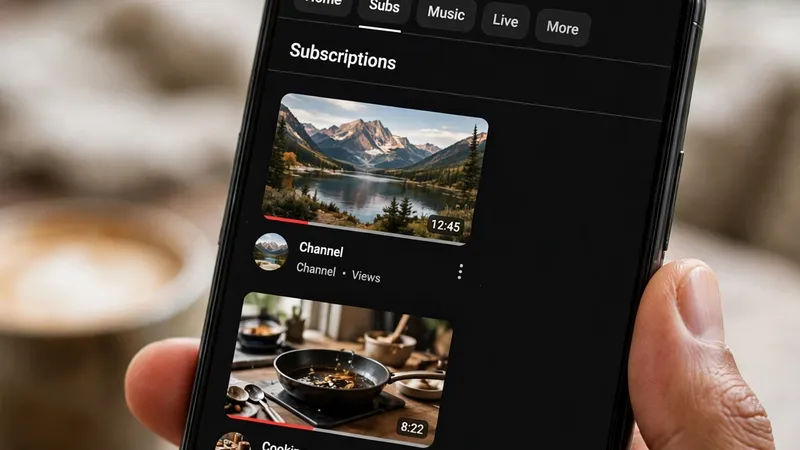
The bottom navigation bar, which for years held five buttons — Home, Shorts, Create, Subscriptions and your profile picture — now has only four: Home, Shorts, Create and Profile. Your subscriptions have not been deleted, and you have not unfollowed any channel. They have simply moved. Subscriptions now live at the top of the Home tab under a new label, "Subs", in a top row that also shows Home, Music, Live and More, with Movies and TV and other sections available through More, according to Gadgets 360.
Finding Subs takes a little getting used to. Gadgets 360 reports that the new top navigation bar hides about two seconds after you open the app, so you need to drag down on the feed to make it appear, then tap Subs to see the latest videos from the channels you follow. The Subs feed itself works the same way as before, showing your subscriptions' newest uploads, and 9to5Google notes that the whole change arrives through a server-side switch rather than a specific app update — which is why it can appear on your phone without a download, and why a friend may have it while you do not.
The redesign also puts Shorts and creation front and centre. Shorts now take up much more of the Home feed, and if that is not what you want, Gadgets 360 reports there is a three-dot menu near the top of the Home screen with a "Show fewer Shorts" option. The new design also brings custom feeds: by tapping the plus sign at the top of the Home feed you can describe the kind of videos you want in plain language — a topic, a channel, a video style — and YouTube builds a dedicated feed from it. As reported by Gadgets 360, free users can keep up to three active custom feeds, while Premium users can add up to eight, and the feature is appearing in more markets over time rather than everywhere at once.
Early reaction to the change has been strongly negative, according to 9to5Google, which reports that users are unhappy above all about losing the Subscriptions button they tapped every day, breaking years of habit. The criticism is understandable: for many people, opening YouTube means catching up with the channels they follow, and that is now one extra step away and hidden behind a bar that disappears. YouTube has not said it will bring the old bottom tab back.
For now, the practical advice is simple: open the app, tap Home, drag down if the top row is hidden, and tap Subs. If the new look has not reached you yet, it should arrive over the coming days as the rollout spreads. And if you are thinking of starting your own channel in this new YouTube, our guide explains how to start a YouTube channel step by step.
What to Do Next
— 4 steps to do right now- Open the app and tap Home — your subscriptions now live at the top of the Home tab under a new label, “Subs”.
- Drag down, then tap Subs — the top navigation bar hides about two seconds after you open the app, so drag down on the feed to make it appear.
- See fewer Shorts if you want — use the three-dot menu near the top of the Home screen and choose the “Show fewer Shorts” option.
- Try a custom feed — tap the plus sign at the top of the Home feed and describe the kind of videos you want in plain language — free users can keep up to three active custom feeds, while Premium users can add up to eight.
FAQ — Frequently Asked Questions
Tap a question to see the answer.
Q Have I unfollowed all my channels? ▾
No — your subscriptions have not been deleted, and you have not unfollowed any channel. They have simply moved to “Subs” at the top of the Home tab.
Q Why can't I find Subs? ▾
The new top navigation bar hides about two seconds after you open the app — drag down on the feed to make it appear, then tap Subs to see the latest videos from the channels you follow.
Q Do I need to update the app to get the new design? ▾
No — the change arrives through a server-side switch rather than a specific app update, which is why it can appear on your phone without a download, and why a friend may have it while you do not.